The Rundown Newsletter
View Results
Ian Campbell | April 6, 2026
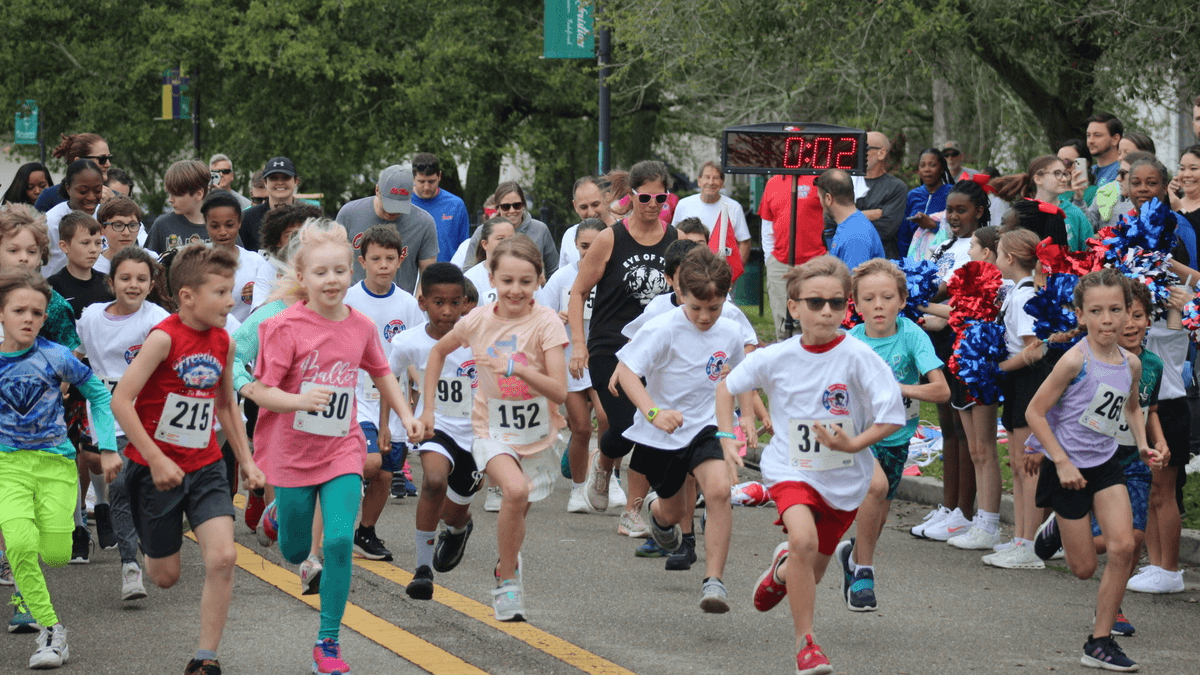
Last-minute registration changes. Runners switch distances 45 seconds before the gun goes off. Volunteers who’ve never timed anything more complex than a microwave pizza. If you’ve ever organized a 5K race, you know the chaos.
Pass Christian High School in Mississippi has figured out how to handle all of it — and make the whole thing look easy. Their annual Read Write Run 5K & Kindness Event just wrapped its second year using Run The Day, and the results speak for themselves: accurate timing, instant results, and a race director who’s now volunteering to be a reference for other schools.
This is how they did it.
Most school fun run and 5K events are organized by people who aren’t professional race directors. They’re teachers, PTA volunteers, and administrators who already have full plates. They need registration, timing, and event logistics handled without a steep learning curve or a big race event budget.
The typical options aren’t great. Professional timing companies can cost thousands or even tens of thousands of dollars — costs that eats directly into the dollars being fundraised for the cause. Manual timing with stopwatches and clipboards is error-prone and slow, especially when you’re juggling dozens of age groups from first graders to grandparents.
According to the Aspen Institute’s Project Play research, children who are physically inactive are twice as likely to experience mental health problems as those meeting weekly recommendations. School 5K events are one of the most accessible ways to get kids moving — but only if organizing them doesn’t become a burden that kills the event before it starts.
The Read Write Run 5K faced exactly this challenge. They needed a solution that non-technical volunteers could operate on, that wouldn’t drain their fundraising budget, and that could handle the unpredictable reality of a school race where plans change by the minute.
The Read Write Run 5K & Kindness Event isn’t a typical school fun run. It’s a community-wide race with competitive age group categories. The 2026 event featured runners across more than a dozen age divisions, from kids under 8 all the way to a 60+ category.
Age group awards that runners expect to be announced in real-time creates complexity. You need a race registration platform flexible enough to handle a 7-year-old and a 65-year-old signing up on the same system. You need timing that can sort results into age and gender categories automatically. And you need it all to work when things go sideways.
And at school races, things always go sideways.
“We had several people register and then change their minds about what distance to run 45 seconds before the race started.” said Jessica, the event organizer. “Some didn’t even bother telling us they’d changed their minds.”
Runners were switching distances — jumping from the 5K to the 1 mile fun run or vice versa — right up until the starting line. In a manual timing setup, that’s a nightmare. Bib numbers don’t match runners. Results get scrambled. Volunteers panic. But Jessica and her team handled it in real time.
“Even with that, we were able to quickly fix the issues on the fly and get the results out without a hitch.”
Here’s what actually made the difference, broken down by the problems it solved:
Run The Day’s registration system lets the Read Write Run team manage entries digitally — including edits, payments, cancellations, and additions right up to race day. When runners dropped out or switched distances at the last second, volunteers could update the system on a tablet or phone without shuffling through paper forms.
How to apply this to your school 5K: Set up online registration at least 4–6 weeks before your event. Use a platform that allows race-day edits so your volunteers aren’t stuck with a printed roster that’s already outdated. Run The Day’s DIY race timing approach can save your school hundreds of dollars compared to hiring a professional timing company — money that goes back to your fundraiser.
Nobody on the Read Write Run team is a professional race timer. They didn’t need to be. The app walks volunteers through the timing process step by step. Jessica called it “absolutely flawless” — and this was a race with competitive age group winners and an overall winner with a fast time of 19:37 (Larkin Lewis).
How to apply this to your school 5K: You don’t always need timing mats, RFID chips, or a dedicated timing crew. A smartphone and the Run The Day app are enough to produce accurate, sortable results. For a deeper look at how a small race handles DIY timing successfully, check out the Trapp Cabin Trail Races case study.
As soon as runners crossed the finish line, results were available online — sortable by age group, gender, and overall placement. No waiting for a volunteer to type up a spreadsheet. No handwritten results taped to a folding table.
The full results from the 2026 Read Write Run 5K are available here.
How to apply this to your school 5K: Share your results link on social media the same day as your race. Parents, runners, and community members will share it further — it’s free marketing for next year’s event.
The 2026 Read Write Run 5K & Kindness Event drew runners across every age demographic. The full list of age group award winners is shown below:
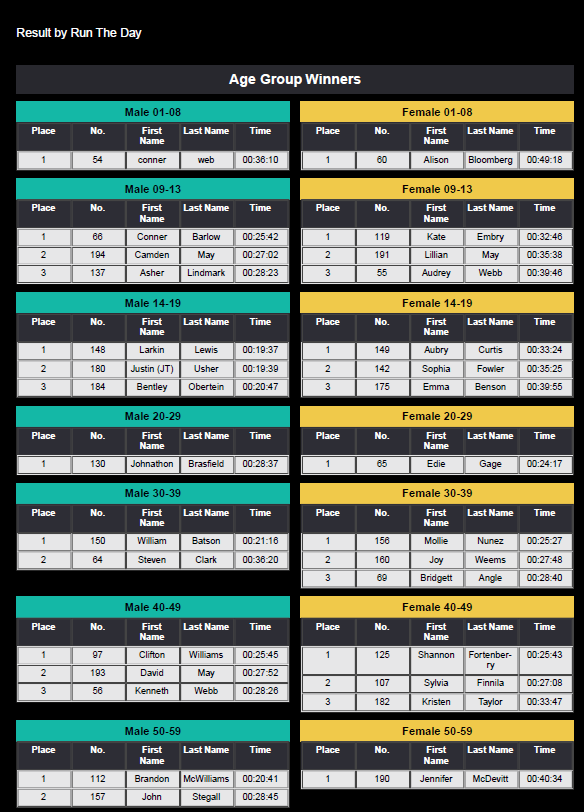
Read Write Run 5K & Kindness Event 2026 — View full results
The range of finishing times tells the story. This wasn’t a one-demographic event. It was a genuine community race with competitive fields across age groups — and the timing system handled every single category without a hiccup.
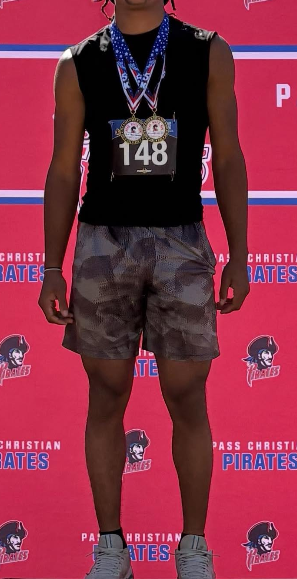
Overall winner Larkin Lewis (bib #148) at the 2026 Read Write Run 5K & Kindness Event.
Want to see the full event in action? Watch the recap video on Facebook.
Jessica didn’t just say the app worked. She offered to personally vouch for it to other school districts:
“If you are ever speaking with a school district that is on the fence about using the app for their fundraiser, please feel free to give them my phone number or email address. I’d be more than happy to tell them how beneficial it has been for our race.”
That’s not a paid endorsement. That’s a teacher who found something that made her job easier and wants other schools to know about it.
Jessica also passed along feedback from Brandon Warden, the person in charge of IT at Pass Christian High School: he joked that if the school ever decided the app was too expensive, he’d “be sick that day” rather than go back to the old way of doing things.
When the people running your event are lobbying to keep a piece of technology, you know it’s working.
Curious what it costs? Check out Run The Day’s pricing — it’s designed to keep more money in the hands of the cause you’re fundraising for.
If you’re planning a school fun run, here’s the short version of what the Read Write Run team’s experience teaches us:
• Start registration early and keep it digital. Online registration reduces day-of paperwork and lets you handle changes without stress.
• Don’t pay for professional timing unless you need it. DIY timing with a well-designed app produces professional-quality results at a fraction of the cost. That saved money goes directly back into your school or fundraiser.
• Plan for chaos. People will register and not show up. People will show up and not register. People will want to switch distances. Your system needs to handle all of it without breaking down.
• Publish results immediately. Instant results create excitement, encourage sharing, and build momentum for next year’s event.
• Recruit a small, focused volunteer team. You don’t need a dozen timing experts. You need two or three people comfortable with a smartphone app.
Organizing a school 5K should raise money and build community — not burn out the teachers and parents running it. The Read Write Run 5K & Kindness Event proves that a school district with no professional timing experience can put on a race that’s competitive, well-organized, and fun for every age group.
Run The Day exists to make that possible. The app handles registration, timing, and results so that teachers, administrators, and parent volunteers can focus on the event itself — not the logistics behind it. Whether you’re organizing your first school fun run or looking to level up a race you’ve been doing for years, Run The Day’s technology and team is built for people who don’t do this for a living.
Ready to see how it works for your school? Start your free race setup today and find out why organizers like Jessica are volunteering to spread the word.