The Rundown Newsletter
View Results
Ian Campbell | September 8, 2026
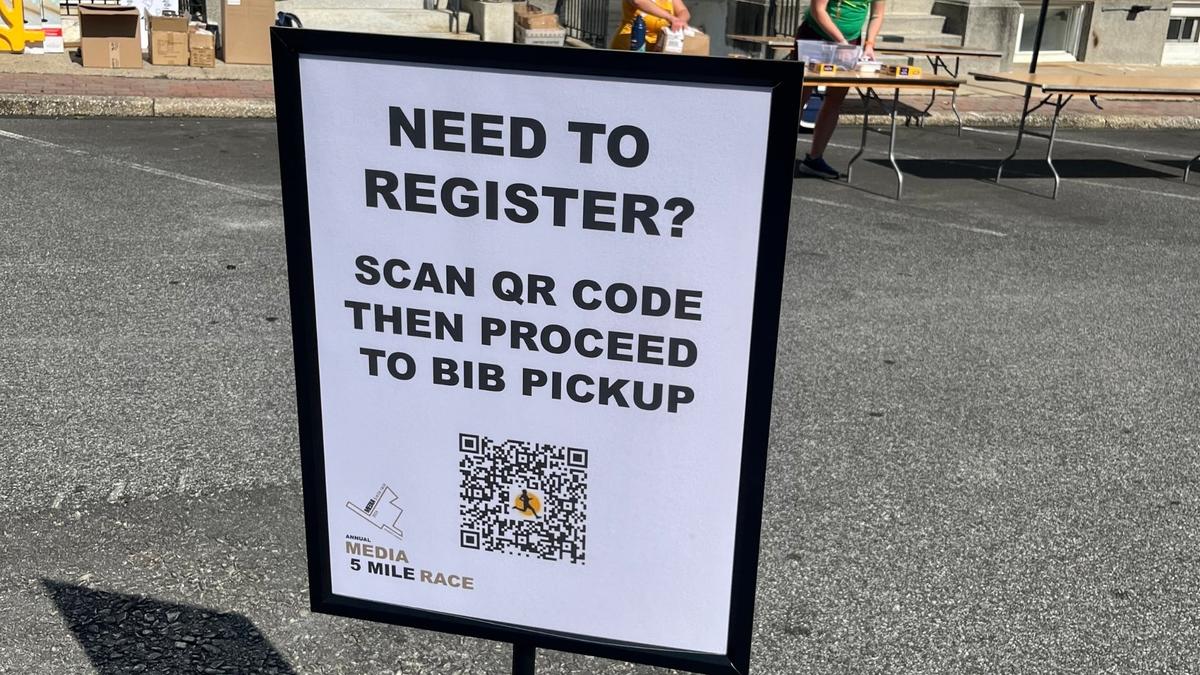
Race-day registration doesn't have to mean clipboards, paper forms, and long lines. A QR code can send runners directly to a mobile registration page so they can register, complete required waivers, and pay from their phones.
For race directors, QR code registration can reduce manual data entry and make last-minute registration easier to manage. When the QR code connects directly to your race registration platform, participant information can flow into the same system your team uses for registration and race-day operations.
In this guide, you'll learn how QR code race registration works, where to place QR codes on race day, how to prepare volunteers, and what to look for in registration software that supports QR codes.
If you're planning a 5K from the ground up, our 5K race planning checklist can help you organize budgeting, sponsorships, registration, volunteers, timing, and race-day logistics.
A QR code gives runners a quick way to access your registration page using their smartphones.
Instead of asking a volunteer to manually enter participant information from a paper form, runners can enter their own information directly into the registration system.
This can help your race team:
QR codes can be especially useful for 5Ks, charity races, school events, Turkey Trots, and community races where volunteers often handle race-day registration.
The QR code itself isn't what makes the process efficient. The bigger advantage comes from connecting it to a mobile-friendly race registration platform that can manage the participant information after a runner scans it.
Setting up QR code registration is straightforward when your registration platform supports it.
Start with a race registration platform that provides a mobile-friendly registration page and lets you connect a QR code directly to it.
Before choosing a platform, check that runners can easily:
The QR code should lead directly to your registration page rather than requiring runners to search for your event.
Once your race registration page is ready, generate a QR code that links directly to the page.
Before printing it:
Testing the complete process before race day helps you catch problems before runners arrive.
With Run The Day, organizers can generate a QR code that directs participants to their race registration page.
A QR code only works if runners can see and scan it easily.
Place QR codes in high-traffic areas such as:
Think about the runner's journey from arrival to registration. Place the code where someone who still needs to register is most likely to see it.
QR codes can reduce manual work, but volunteers still play an important role.
Train volunteers to:
The goal isn't to remove volunteers. It's to let them spend less time entering information and more time helping participants.
This is where QR code registration becomes more valuable than simply putting a QR code on a sign.
Once a runner registers, their information may also be needed for:
Using a connected race registration platform can reduce the need to manually transfer information between systems.
For a race director, the goal isn't simply to get a runner registered quickly. It's to make sure registration information is accurate, accessible, and useful throughout race day.
This also connects naturally with the broader benefit of using an all-in-one race platform, where registration, participant information, timing, and race-day workflows can work together.
Strategic placement can make a big difference.
Place a large QR code where runners can see it as soon as they arrive.
Some participants may decide to register only after arriving at the event. Giving them access to the registration page before they reach the registration tent can help reduce congestion.
A QR code can help direct participants to the correct registration or event information.
Add QR codes to signs, banners, and other event materials when appropriate.
QR codes can also connect pre-race marketing materials directly to your registration page.
Pro Tip: Don't use a QR code on printed materials without testing it first. Scan every printed version before race day to make sure it works.
Paper registration can work for very small events, but it creates more manual work as participation grows.
| QR Code Registration | Paper Registration |
|---|---|
| Runners enter their own information | Volunteers may need to enter information |
| Digital participant records | Manual data entry may be required |
| Mobile-friendly | Paper-dependent |
| Easier to connect with registration software | Additional data transfer may be needed |
| Less paper handling | Forms must be collected and organized |
For larger community races, reducing manual data entry can help volunteers focus on participant support and other race-day responsibilities.
That doesn't mean paper forms should always be eliminated. A backup process can still be useful if a runner has a phone problem, internet connectivity issue, or another unexpected problem.
Fix: Make the QR code large enough to scan easily from the distance where runners will encounter it.
Fix: Link directly to the race registration page and test the code before printing.
Fix: Complete the registration process yourself on multiple phones before race day.
Fix: Have volunteers available to assist participants and maintain a backup process for unexpected problems.
Fix: Choose registration software that keeps participant information connected to the rest of your race-day workflow.
Don't evaluate the QR code feature by itself.
Look for race registration software that also supports:
The QR code should be the entry point, not the entire solution.
A connected platform can help move participant information from registration into the other systems your race team relies on.
If you're evaluating whether your registration, timing, check-in, and participant data should work together, learn how all-in-one race platforms can save time and reduce race-day stress.
Run The Day allows race organizers to connect QR codes directly to their race registration experience.
Instead of asking runners to find your registration page manually, you can display a QR code on race-day signs and direct participants straight to registration.
Run The Day also brings registration together with other race-management needs, including:
For community races and growing events, this easy-to-use, one-stop-shop approach can help reduce the number of disconnected tools race organizers need to manage.
If you're looking for a simpler way to manage registration and race-day operations, tell us about your race and see how Run The Day can help.
A QR code for race registration is a scannable code that directs participants to a race's online registration page. Runners can scan the code with their smartphone and complete registration digitally.
Yes. If the QR code links to a mobile-friendly registration page, runners can scan the code and complete registration from their phones.
Common locations include registration tents, entrances, parking areas, check-in tables, banners, and race-day signs.
It can reduce the need for paper registration, but race organizers should still consider having a backup process for participants who cannot use their phones or encounter technical problems.
The QR code itself does not provide timing integration. That depends on the race registration platform and its connection with timing and results systems.
Yes. QR code registration can be especially useful for 5Ks and community races where organizers may need to handle last-minute registrations efficiently.
QR codes can make race-day registration faster and easier, but the real value comes from what happens after a runner scans the code.
When a QR code connects directly to a mobile-friendly race registration platform, runners can register from their phones while organizers can keep participant information organized for check-in, bib assignments, timing, results, and other race-day needs.
For 5Ks, charity races, school events, and community races, that can mean less manual data entry, fewer registration bottlenecks, and a smoother experience for both runners and volunteers.
Run The Day helps race organizers connect registration with the rest of their race-management workflow through an easy-to-use, one-stop-shop platform.